
Guides › Setting Up Bank and Cash Accounts
Setting Up Bank and Cash Accounts
RBTERP team · · 3 min read
How to set up each bank account, cash box and wallet as its own account, enter opening balances, and keep business and personal money apart.

Bank & Cash in RBTERP, with a sample company and fictional data.
Cash is the figure business owners watch most closely, so it must be the figure they trust most. That starts with setting up each place money is kept as its own account, with its correct opening balance.
One account for each place money is kept
Create a separate account for:
- Each bank account, including separate currency accounts.
- Each cash box or petty cash float.
- Each mobile wallet the business uses to receive or pay.
- Each credit card used for business payments, if any.
The test: if it has its own statement or its own physical count, it gets its own account. Merging two bank accounts into one in the books makes reconciliation impossible.
Keep business and personal money apart
Personal spending from the business account, or business receipts into a personal account, are the most common source of confused books in owner-run businesses. If it happens, record it, as drawings or as capital introduced, rather than ignoring it.
Opening balances
For each account, enter the balance in your books on the day you start, not simply the balance on the statement. The difference between the two is the outstanding items: cheques you have written that have not cleared, deposits not yet credited. Keep that list; those items will appear on the first statement and must be matched. See opening balances.
Petty cash
Run petty cash on a fixed float:
- Give the float a set amount, say 20,000.
- Every payment out needs a slip or receipt.
- When it runs low, record the receipts as expenses and top it back up to the float.
- Count it at every month-end. Cash plus receipts should equal the float.
Bank accounts in RBTERP
- Accounts: bank and cash accounts are created in the Bank module, under Accounts. The setup wizard requires at least one before go-live.
- Registers: each account has its register of transactions, with search. Customer payments, supplier payments, payroll and loans all appear in the register of the account they moved through, alongside the journal the paying module posted.
- Opening balances: data migration can load each bank account's opening book balance. An account that already has one refuses a second.
- Agreement: the bank's balance, its register and its ledger account agree after every step, because payments from Sales, Purchases and HR move the bank account through the Bank module.
- Payroll and loans: salaries are paid only from an account that covers the batch, and a frozen or closed account pays nothing.
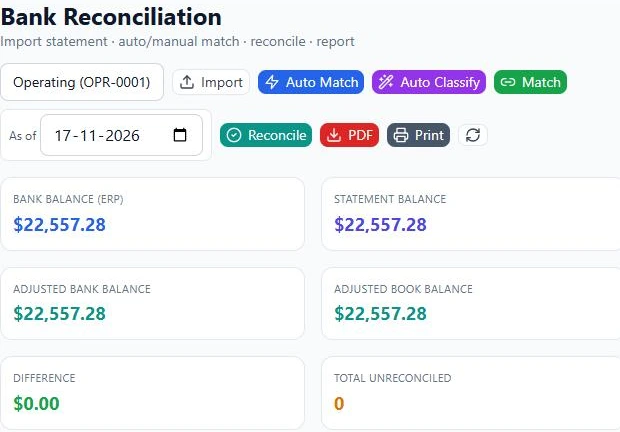
- Reconciliation: each account is reconciled to its statement. See bank reconciliation, step by step.
- The Bank dashboard shows total cash, monthly inflow, outflow and net cash flow, the cash-flow forecast, and fraud and anomaly alerts for unusual transactions.
Good practice
- Reconcile every account monthly.
- Count cash at least monthly, with a second person present.
- Limit who can record payments from each account.
- Close accounts you no longer use, both at the bank and in the books, once their balance is zero.
This guide uses the Bank & Cash module of RBTERP: Every bank and cash account in one place, with a 30/60/90-day cash-flow forecast and alerts for unusual transactions.