
Guides › Bank Reconciliation, Step by Step
Bank Reconciliation, Step by Step
RBTERP team · · 4 min read
How to reconcile your cash book with the bank statement every month: what to match, what to post, and what a difference really means.

Bank & Cash in RBTERP, with a sample company and fictional data.
A bank reconciliation proves that the bank balance in your books and the balance on the bank's statement describe the same money. They are rarely equal on any given day, and that is normal. The reconciliation explains the gap item by item. When every item is explained, you can trust the cash figure in your accounts.
Why the two balances differ
There are only a few honest reasons for a difference:
- Timing. You wrote a cheque that the supplier has not banked yet, or you deposited money that the bank had not processed when the statement was printed. These are called outstanding cheques and deposits in transit.
- Things the bank did that you have not recorded. Bank charges, interest, standing instructions, loan instalments and direct deposits from customers appear on the statement first.
- Returned cheques. A customer's cheque you recorded as received has bounced.
- Mistakes. A wrong amount, a transaction entered twice, or one entered in the wrong account, on your side or occasionally the bank's.
Anything that does not fit one of these needs investigating before you close the month.
Before you start
You need the bank's statement for the period and the closing balance printed on it. Reconcile one bank account at a time, and reconcile every month. A reconciliation left for six months is ten times the work of six monthly ones, because one unexplained item hides the next.
The steps
- Bring in the statement. Enter the statement lines or import the file your bank gives you. Check that the opening balance on the statement equals the closing balance of your last reconciliation. If it does not, stop: something was changed in a period you had already reconciled.
- Match what agrees. Pair each statement line with the entry in your books that has the same amount and a nearby date. A cheque number or payment reference that agrees makes the match certain.
- Record what only the bank knows. For bank charges, post an expense. For interest received, post income. For a returned cheque, reverse the receipt so the customer owes you again.
- Investigate what is left on the statement. A deposit you cannot identify is usually a customer paying directly into the account. Find out who paid before posting it; do not park it in a suspense account and forget it.
- List what is left in your books. These are your outstanding cheques and deposits in transit. They should clear on next month's statement.
- Check the arithmetic. Statement balance, plus deposits in transit, minus outstanding cheques, should equal the balance in your books. The difference must be exactly zero.
- Lock it. Once it agrees, complete the reconciliation so the matched entries cannot be changed.
What to look at twice
- Old outstanding cheques. A cheque still outstanding after several months may be lost, or may never have been sent. Ask the supplier.
- Round differences. A difference that divides evenly by 9 often means two digits were swapped, such as 5,400 entered as 4,500.
- The same amount twice. Two identical payments on the same day deserve a second look.
- A difference you are tempted to write off. A small unexplained difference this month is often the first sign of a larger one.
Doing it in RBTERP
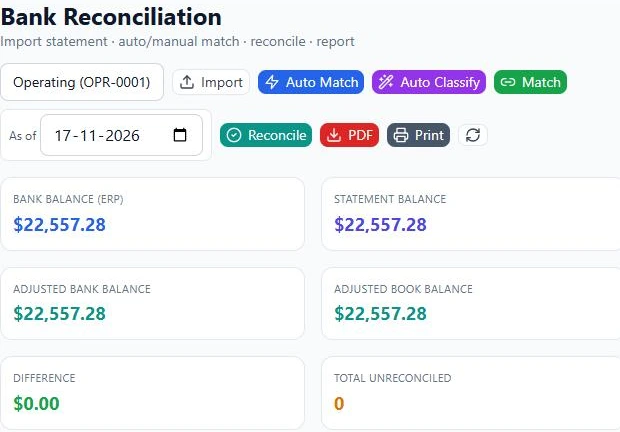
In RBTERP the reconciliation workbench is under Banking, then Reconciliation. Choose the bank account, then:
- Import the statement as a CSV, Excel or text file, or paste the rows. The importer detects the columns, shows a preview and skips rows it has already imported.
- Set a tolerance in days and amount, and press Auto Match. Each statement line is paired with a bank transaction by amount and date, preferring matches where the cheque number or reference also agrees.
- Press Auto Classify to post routine items: bank charges, interest income and returned cheques each get a balanced journal entry. Anything it cannot recognise with certainty goes to a review queue, where you choose the account yourself.
- Match the rest by hand. One statement line can be matched to several book entries, a line can be matched in part, split into pieces or merged with another, and supporting documents can be attached.
- Press Reconcile when the difference is zero. The reconciliation is stored and the matched entries are locked. A reconciliation that does not agree is refused, and the screen shows the difference.
The cards at the top show the statement balance, the adjusted balance, the difference, outstanding cheques and deposits in transit as you work, so you can see how much is still unexplained.
How often
Monthly at least, and before you close the month. Businesses with many daily receipts reconcile weekly. The more often you do it, the smaller each one is.
This guide uses the Bank & Cash module of RBTERP: Every bank and cash account in one place, with a 30/60/90-day cash-flow forecast and alerts for unusual transactions.